WooCommerce Conditions
- General
BricksExtras adds optional additional element conditions for Woocommerce users, based around products, users and cart status.
(Note that these options will only appear inside Bricks with WooCommerce plugin activated).
Table of Contents
Looking for Woocommerce Subscriptions?
Cart count
Render element depending on whether the total number of items in the cart is currently above/below/equal specified value. (Note – doesn’t accept 0 as a value)
Operators: ==, !=, >=, <=, >, >=
Cart empty
Render element depending on whether the cart is currently empty
Operators: ==
Cart total
Render element depending on whether the total cost of the products in the cart is currently above/below/equal specified value. (Note – doesn’t accept 0 as a value)
Operators: ==, !=, >=, <=, >, >=
Cart weight
Render element depending on whether the total weight of the products in the cart is currently above/below/equal specified value.
Operators: ==, !=, >=, <=, >, >=
Current product in cart
Render element depending on whether the current product (either the product being viewed in a single view or the product inside of a query loop) is in the cart.
Operators: ==
Product allows backorders
Render element depending on whether the current product (either the product being viewed in a single view or the product inside of a query loop) allows back orders.
Product has category
Render element depending on whether the current product (on single product pages or in the query loop) has the selected product category assigned to it.
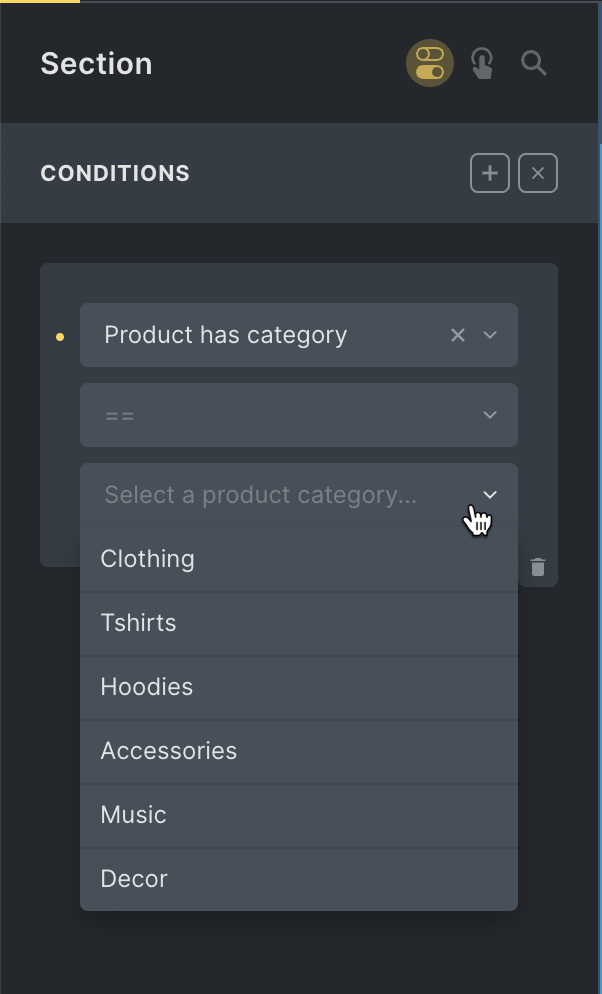
Operators: ==, =!
Product has tag
Render element depending on whether the current product (on single product pages or in the query loop) has the selected product tag assigned to it.

Operators: ==, =!
Product cross sells count
Render element depending on whether the current product has above/below/equal a certain number of products as cross sells.
Product in cart
Render element depending on whether a specific product is currently in the user’s cart.
Operators: ==
Product in cart has a coupon applied
Render element if the selected product is in the cart and has a valid coupon applied.
Operators: ==

Note: A page reload is needed for this to work after a product has been added to the cart via AJAX.
Product in stock
Render element depending on whether the current product is in stock.
Operators: ==
Product is downloadable
Render element depending on whether the current product is a downloadable product.
Operators: ==
Product is virtual
Render element depending on whether the current product is a virtual product.
Operators: ==
Product on backorder
Render element depending on whether the current product is on backorder.

Operator: ==
Product rating
Render element depending on whether the average rating of the current product is above/below/equal specified value.
Operators: ==, !=, >=, <=, >, >=
Product type
Render element depending on whether the current product is either simple, variable, grouped or external/affiliate product.
Operators: ==
Product upsell count
Render element depending on whether the current product has above/below/equal a certain number of products set as upsells.
Product weight
Render element depending on whether the weight of the current product is above/below/equal specified value.
Operators: ==, !=, >=, <=, >, >=
User has pending order
Render element depending on whether the current user has a pending order.
Operators: ==
User has order with status (v1.6.8+)
Render element depending on whether the current user has orders with a specific status
Operators: ==
Options: Pending payment, Processing, On hold, Completed, Cancelled, Refunded, Failed, Draft
User purchased current product
Render element depending on whether the current user already purchased the current product.
Operators: ==
User purchased product
Render element depending on whether the current user already purchased a specific product. (choose the product from the dropdown)
Operators: ==
User just purchased product (thank you page)
Render element depending on thank you page, depending on whether the current user has just purchased a specific product (ie the chosen product is part of the current order)