
Here are a few highlights of some of the new features and refinements to existing elements. See the changelog for the full list of changes.
Component & Nestable Component Support
Bricks has improved the component functionality quite a lot with v2.0, adding nestable components and more useful property types. In BricksExtras v1.5.4, we now have all the elements fully supporting being used as part of both components and nested components!
Previously, many BricksExtras elements were using selectors / element IDs a lot as part of their functionality, which doesn’t make as much sense in a component-based workflow (where copies of the same elements with the same selectors & element IDs can appear multiple times on the page & so could cause issues).
Mostly, things will ‘just work’ now when using the elements in different instances of the same component. But for the elements where there are settings to allow us to manually choose a selector to connect with other elements, we now have ‘component scope‘..
Component Scope
Generally, when building components in Bricks, we can’t assume where or how they’ll be used in the future. Components could be added to any page where there could be other elements on the page with the same class names or element IDs, or the same component could be used multiple times (even inside another component).
If we’re relying on using selectors to target other elements, to prevent conflicts, we need to ensure the functionality is contained only within the component instance. This is what the component scope option is for.
We’ll be adding more information and use cases for this feature, but here’s one common use case;
Gallery slider component
Let’s say we’re creating a ‘gallery slider’ component that consists of a few elements, including a Pro Slider, some Pro Slider Controls & a Dynamic Lightbox to show the images in a lightbox.
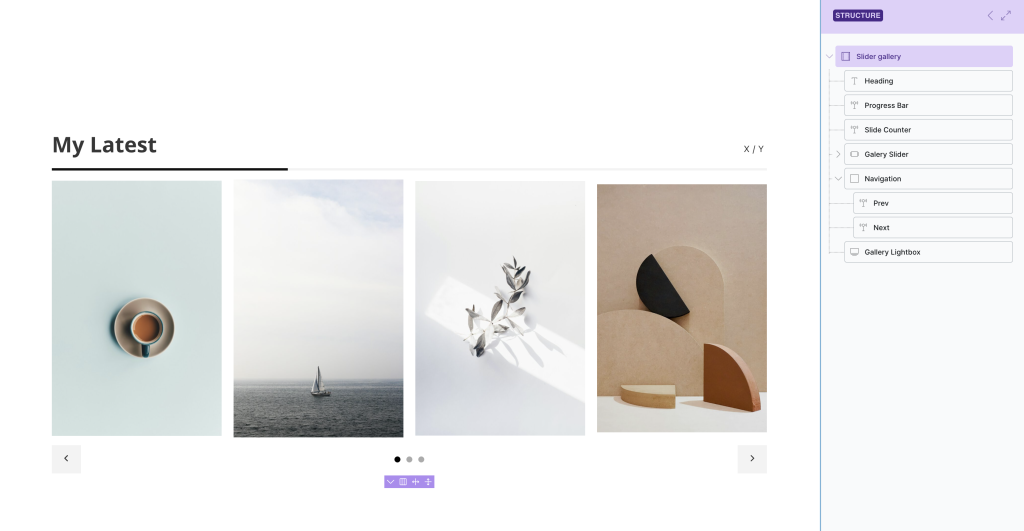
Here, we’d want..
- The navigation controls to control only this one slider
- The progress bar to follow the progress of this one slider
- and.. we’d want the lightbox to show images from inside this one slider when clicked.
Let’s say the slider has a class ‘my-slider’, which they’re all targeting. So in the element settings, we’d typically have something like ‘.my-slider’.
In v1.5.4, we find a new component scope option under the selector setting.

This means it won’t matter if other sliders on the page also have the same ‘my-slider’ class or if there are multiple instances of this same component being used together; the functionality will remain contained within that particular instance.
In this example, it means that this slider can only be controlled by those elements within the same component instance.
Many existing elements in BricksExtras use selectors to allow for connecting to other elements.. modals, offcanvas, lightboxes, copy to clipboard buttons, toggle switches, etc. These can all now be used as part of components & all have this component scope option where needed.
More on component scope.
Media Player / Media Playlist / Media Controls
New elements for adding video/audio players to your Bricks pages & templates.
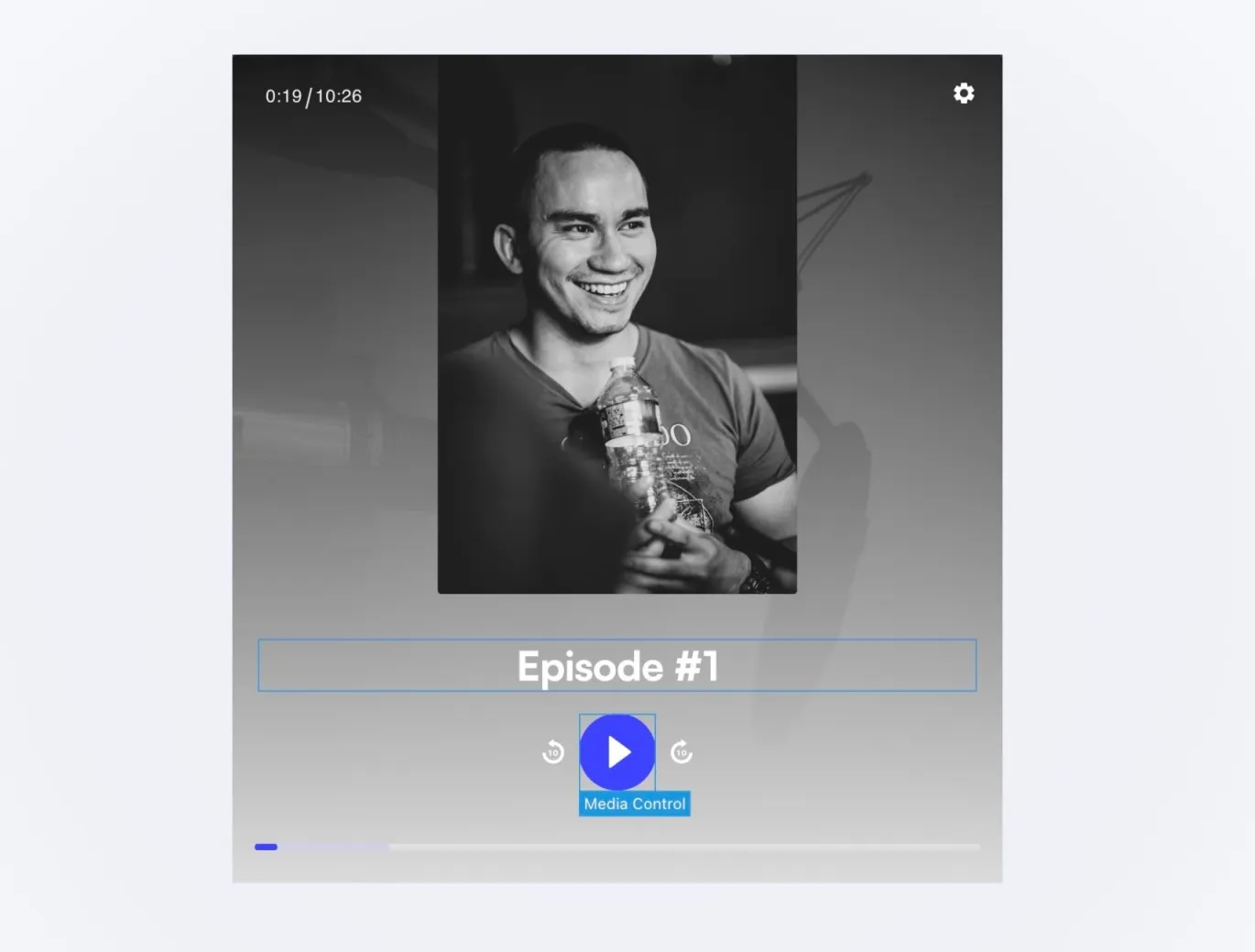
A few things have been changed since the early testing, some things added & some removed to allow more consistent behaviour across devices (with a slightly modified version of the Vidstack library), but the overall concept remains the same.
Use the Media Player either as a quick way to add a nice-looking player to your site, with lots of customization & styling options, or dig deeper by nesting in Media Controls if wanting to build a custom player UI.
To give site visitors easy access to watch multiple videos, the Media Playlist is a useful option. This controller element allows the user to load different media into the same player by clicking the button to load in the next video or audio. Ideal for building a playlist next to a media player. (it supports being inside query loops, so the playlist can be dynamically generated from dynamic data & can be used with filters)
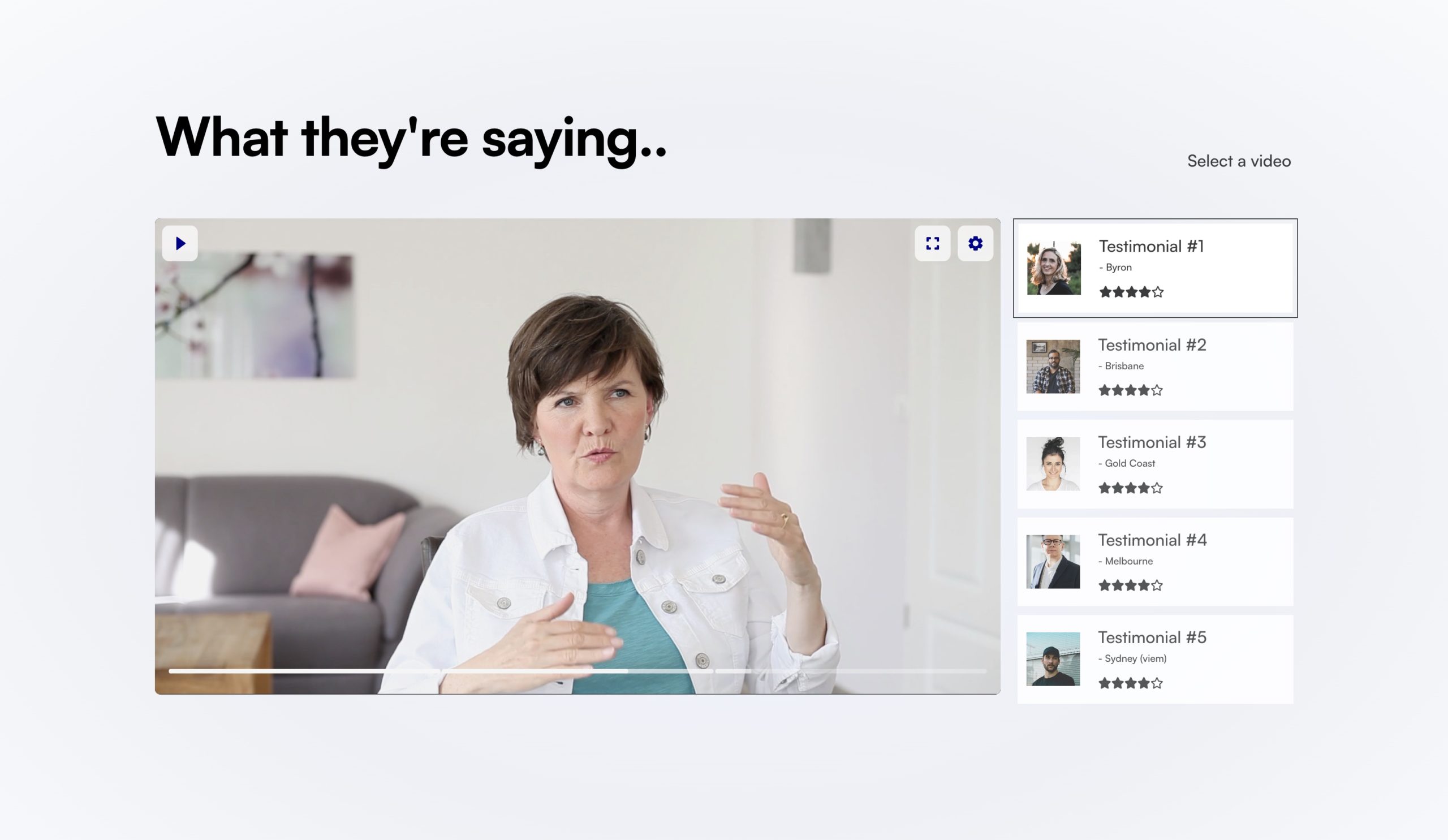
A few things that were recently added;
Bunny Stream Token Authentication Support – For videos hosted at Bunny.net (our recommendation), there’s a ‘Generate Token Authentication’ option built into the media player. This allows to us to control from the player settings when the video URLs from the CDN expire. This is ideal for videos used inside restricted content areas on membership sites where we may to need to protect the videos from being shared outside of that member area.
Multiple sources – If self-hosting, there’s now the option to include multiple sources. Ideal for if wanting to provide seperate URLs for different file types – audio/mpeg, audio/ogg, or video qualities – 720p/1080p (generally we’d advise not to manually add different video qualities, but instead just use HLS where this this is automated from the CDN, but the option is there if needed)
These media player elements can all be used as part of components in Bricks. So the media player, with custom controls & corresponding playlist items, could all be made into one global ‘video with playlist’ component to be used in different places across your site with different content.
WP Menu Query Improvements
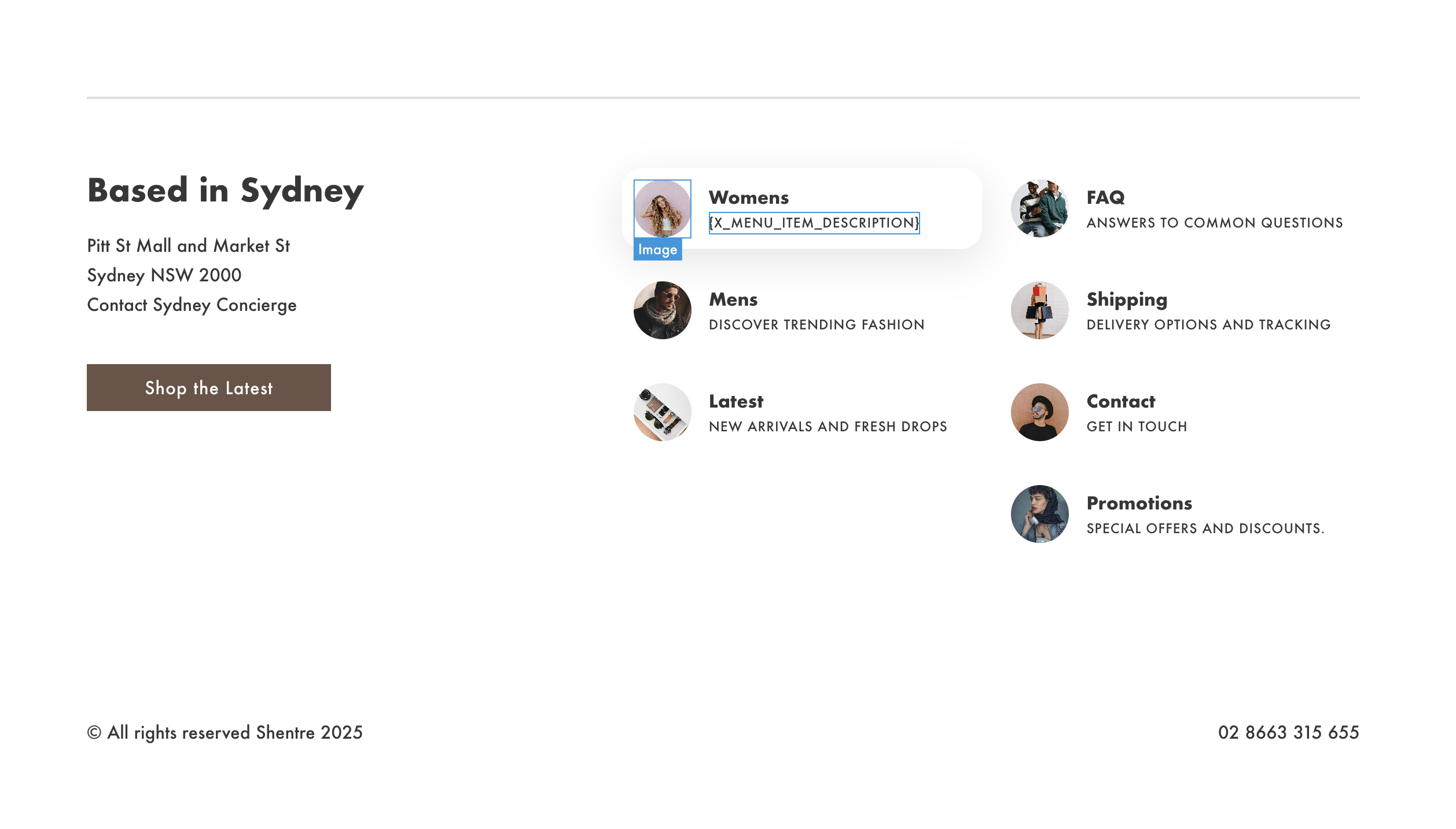
Menu Item custom fields now supported inside WP Menu loops – When looping through menu items using the WP Menu Query Loop, you may wish to include specific data for that menu item, other than the standard menu label, description, for which there are dynamic tags for.
For example, an ACF image custom field on the menu item. Now, those ACF dynamic tags can be used within the WP menu query loops. (ideal for when displaying custom menu lists inside footers or within mega menu dropdowns)
Favorites Improvements
Displaying count total from multiple lists – Many users have been allowing their site visitors to build multiple lists, and needed to way to display a single count total of multiple lists. This is now easy to do by just adding the multiple list names to the x_favorite_count tag, separated by a colon.
Example: to show the total count of both products and posts – x_favorite_count:post:product
Better support for page caching – There were some situations where the button text wouldn’t update with heavy page caching, which has now been addressed.
Favorites now saved as post meta – No behaviour change on the frontend for this, but useful if you wanted to keep track on the admin side of things, to find which posts are being favorited.
Dynamic Chart & Dynamic Table Improvements
Charts can now be styled via CSS variables! One of the previous restrictions here was not being able to change colors with CSS variables as the charts are built via a <canvas> element & JS, which aren’t individual elements that can be styled with CSS. But with this update, using CSS variables within Bricks color settings is fully supported.
Dynamic table data as CSV – Added as an ‘interaction’, this makes it easy to add a ‘click’ interaction to any button for the user to click to download the full table data as a CSV file.
Conditions Improvements
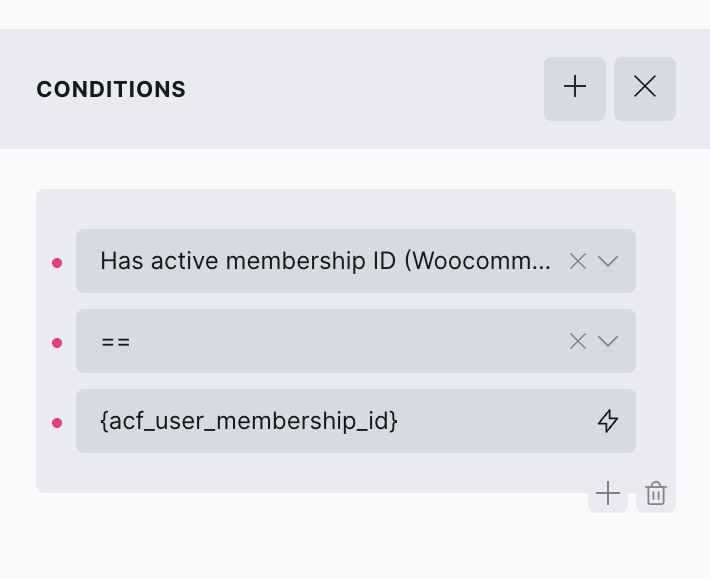
Supporting dynamic data – All the member conditions & WooCommerce conditions where products or membership levels are involved now have a corresponding ID option, making it possible to choose the product/membership via dynamic tags rather than selecting from inside of a dropdown. This makes it much more flexible.
Lightbox Improvements
Dom lazy loading – Enabled by default. Performance improvement for the ‘nest elements’ option, reducing the DOM size on page load.
Grouping Scope – When grouping (allowing multiple items in the same lightbox so the user can navigate between them), there are now three options..
- Default – (The existing behaviour) Will group any items with the same selector on the page.
- Component – Will group items only within the current component instance.
- Query Loop – Will group items only within the same query loop.
Adjacent Post Improvements
Typically with WordPress, adjacent posts are posts that were published before and after the current post being viewed. This query loop has now been extended to allow for more use cases.
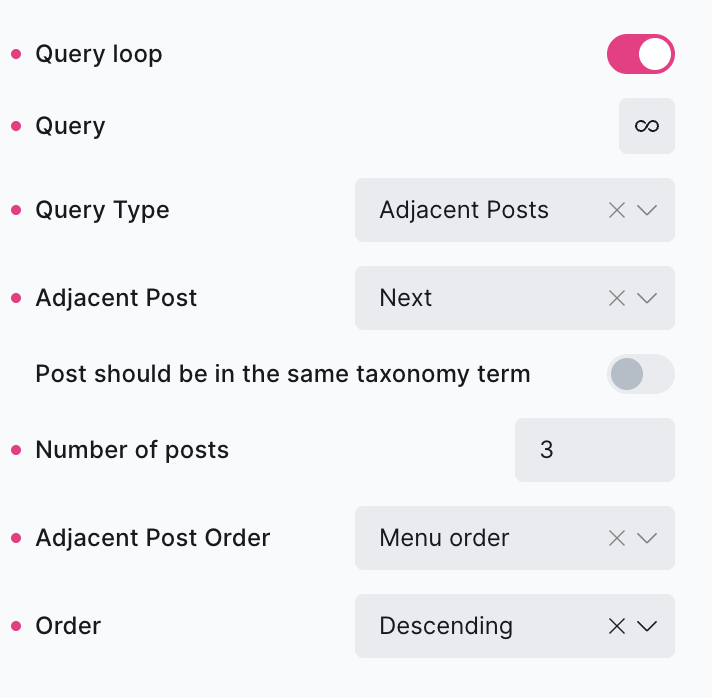
Adjacent post order – Change the order of the adjacent posts, from published date to menu order, post title, ID etc.
Number of posts – Change the number of posts that are included in both ‘previous’ and ‘next’.
Order – Asc or Desc the posts that are output.
Other Improvements
Social Share – BlueSky & Threads have been added to the list of networks.
Slide Menu – If using a menu that contains a mega menu template, there’s now the option to include that content inside of the slide menu element.
Before/After Image – Improved the control over touch area for mobile, making it much easier to work with and see visually where the touch area is inside of the builder.
WSForms – Added new style options for when using the WSForm built-in form styler. (WSForm changes some of the form markup if their own form styler is enabled, meaning some of the previous style options won’t apply)
Bricks’ cascade layer system – With the cascade layer system being enabled by default in Bricks v2, the default CSS in BricksExtras has been adjusted slightly to make sure no style losses when updating to v2 (Splide slider when in vertical direction).
Developer Notes
If you’ve been using custom code to add custom behaviours to elements with JS, note that the element identifiers (the data-x-id attributes given to all elements) will now change if the elements are used inside of components.
Previously, it would always use the element ID (& loop index if inside of a loop)
Now, if inside a component, the identifier will also include the component instance ID. This is to ensure they’re always unique. For elements that are not inside a component, nothing has changed.
Bug Fixes
Lastly, there were also a handful of bug fixes. See the full changelog. Happy to announce that with this release, there are currently no known bugs, as the bug list is now empty.